Small business · VoIP · Australia
Best phone system for small business in Australia
A proper 1300 number, calls ringing on multiple devices, unlimited outbound calls, and SMS. All for about $40 a month. Here is how to set it up.
Prices verified against voipline.net.au/pricing, May 2026
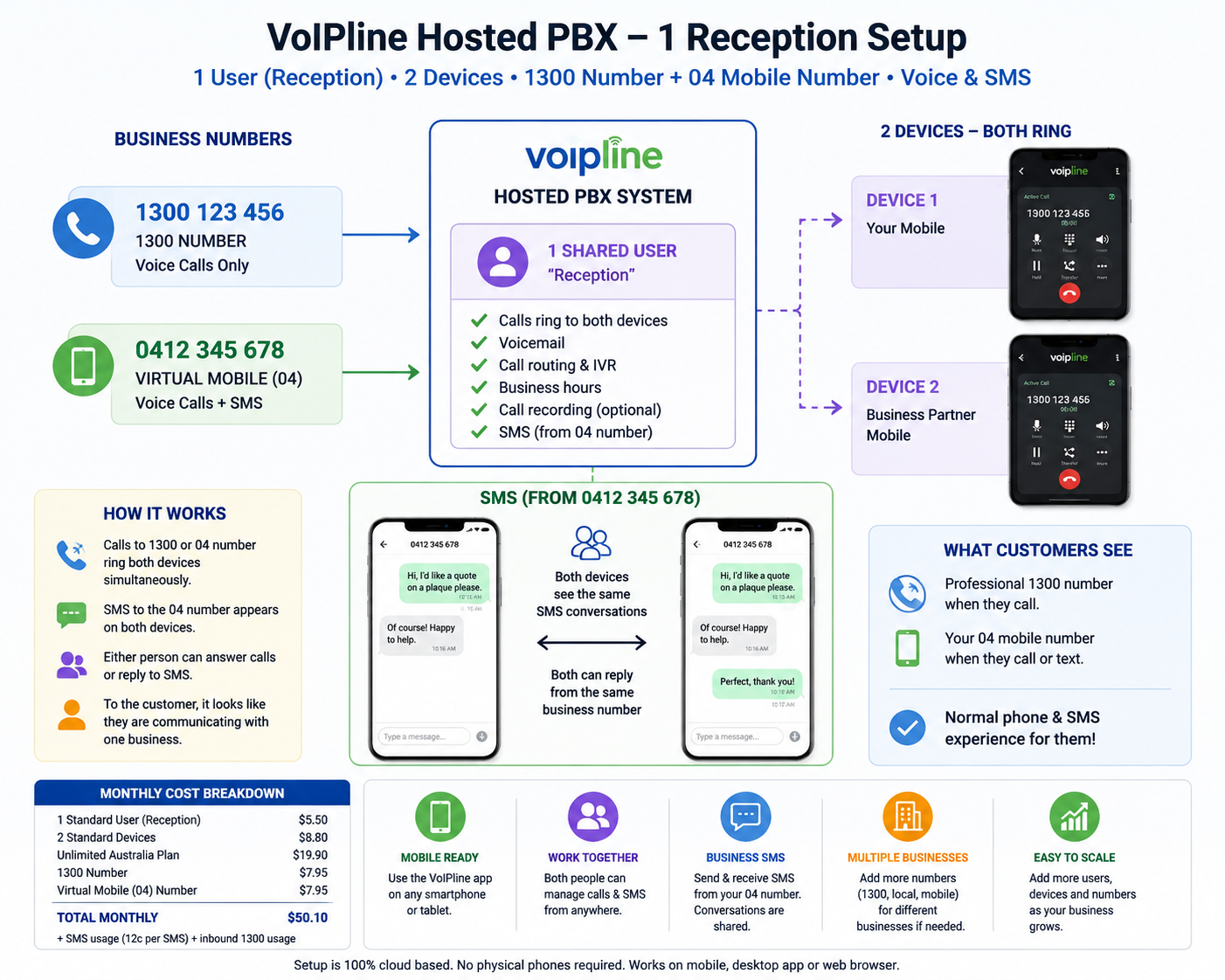
At some point, most small businesses hit the same wall. The mobile number that was fine when you started now feels unprofessional. Customers call at odd hours. You miss calls when you are on a job. Your business partner, VA, or receptionist cannot answer because the number lives on your personal phone. And switching to a “proper” phone system always seemed like it would cost a fortune.
It does not have to. Using VoIPline’s cloud-based hosted PBX, you can have a fully professional setup for around $40 a month. A 1300 number, calls ringing on as many devices as you need, unlimited outbound calls to Australian numbers, and a shared SMS inbox. No desk phones, no lock-in contracts, no IT department required.
This setup suits a wide range of situations:
- Startups that want to look established from day one without the overhead
- Sole operators who want to stop giving out their personal mobile
- Business partnerships where both people need to be reachable on the same number
- Businesses using a virtual assistant or remote receptionist
- Tradies, agencies, and local service businesses that need a professional front
- Owner-operators managing multiple numbers or brands from one account
The setup is the same in each case: one extension, the devices you already own, and a number that follows whoever is available.
How it works
When someone calls your 1300 number, it rings on every device connected to it at the same time. That might be two phones, a phone and a laptop, or a team member’s device on the other side of the country. Whoever is free picks up. If no one answers, it goes to voicemail.
VoIPline runs through a free app called the Webphone, available on iOS, Android, Windows, and Mac. There is nothing to install beyond the app. No desk phones, no hardware, no technician visit.
Whoever answers first gets the call. No forwarding required.
Users and devices explained
VoIPline separates two things that other providers bundle together, and it is worth understanding before you look at the pricing.
A user is the extension: the phone number identity, the voicemail box, the call routing rules. A device is where that extension rings, which could be a phone app, a laptop, or a desk phone. One user can ring on multiple devices at once.
For most small setups, you need one user and however many devices you want ringing. A business partner, a VA, and your own phone can all ring the same number at the same time under a single user licence. You only need separate user accounts if people need separate extensions, separate voicemail, or separate call histories.
What it costs
The Unlimited Australia plan at $19.90 per user per month includes the user licence, one device licence, and unlimited outbound calls to Australian local, national, and mobile numbers. Each additional device, such as a second person’s app, adds $4.40 per month.
Monthly subscription
| Item | Monthly | |
|---|---|---|
| Unlimited Australia plan | $19.90 | User licence, 1 device, unlimited AU outbound calls |
| Additional device licence | $4.40 | Each extra phone or app (partner, VA, etc.) |
| 1300 number | $7.95 | + 5c per minute on inbound calls |
| Virtual mobile number | $7.95 | For SMS. One-time $22 activation fee. |
| Total (1 user, 2 devices, both numbers) | $40.20/month |
So realistically, the base operating cost for this setup is about $40.20 per month with unlimited inbound calls, before outbound usage.
The virtual mobile number is optional. It is only needed if you want to send and receive business SMS. Voice calls only? The 1300 number alone brings your base cost down to $32.25 per month.
Call rates
Outbound, on Unlimited Australia
| Call type | Rate |
|---|---|
| Australian local and national | Unlimited |
| Australian mobile | Unlimited |
| Calls to 13/1300 numbers | 20c per call |
| International | Varies by destination |
Inbound, by number type
| Number type | Inbound rate | Notes |
|---|---|---|
| 1300 number | 5c/min | You pay per minute of each inbound call |
| Virtual mobile | Free | No inbound charge |
| Local number | Free | No inbound charge |
| 1800 number | 6c/min | You pay; caller gets it free |
The 1300 inbound rate is modest but worth factoring in. A hundred minutes of inbound calls adds about $5 to your monthly bill on top of the $7.95 number rental.
SMS
The virtual mobile number supports two-way SMS through the Webphone app. It looks and works like a modern messaging interface, with conversation threads and a shared inbox. Everyone connected to the extension can see incoming messages and reply from the business number, not their personal phone.
| SMS plan | Monthly | Outbound rate | Inbound |
|---|---|---|---|
| PAYG | $0.00 | 10c per SMS | Free |
| SMS Special | $10.00 | 5c per SMS (200 included free) | Free |
Real-world situations this solves
You are on a job and cannot answer. The call rings on your business partner’s or VA’s device at the same time. They pick it up. The customer does not know the difference and does not care.
Someone is on leave. Nothing changes. The number keeps ringing on every other connected device. No forwarding to set up, no handing over a personal phone, no out-of-office message that routes calls to a dead end.
You are a sole operator who wants to look bigger. A 1300 number with a professional greeting and voicemail does that immediately, for the cost of a phone plan. Callers have no idea whether you are a team of two or twenty.
You are using a virtual receptionist. Add their device to the same extension. They answer in your business name, transfer if needed, and the whole thing runs through one number with one inbox.
You want to stop giving out your mobile. Port your personal number elsewhere or just stop advertising it. The 1300 becomes the public-facing number. Your mobile stays private.
What you can add later
The system scales without much friction. Additional numbers are cheap to add. If you run more than one business, each number can have its own greeting, call flow, and business hours, all routing to the same devices and the same inbox. You do not need separate accounts.
If team members eventually need their own extensions and voicemail, adding a second user is straightforward. But for most small operations, one shared reception extension handles everything.
Adding extra numbers
| Number type | Monthly | Activation |
|---|---|---|
| Local number | $1.95 | Free |
| Additional 1300 number | $7.95 | Free |
| Additional virtual mobile | $7.95 | $22.00 once |
A quick note on other providers
When I was putting this together I had a look at a few alternatives. Alltel offers 1300 numbers in Australia and is a solid option, but equivalent setups tend to land around $75 to $100 per month before inbound usage (alltel.com.au/1300-numbers). Aircall and JustCall both came up in searches, but they are built for sales teams and contact centres. Aircall starts around $160 per month (aircall.io/en-au), and JustCall around $110 to $130 AUD per month (justcall.io). Both are good products if you need deep CRM integrations, AI call analysis, or outbound sales tooling. For a small business that just needs a clean, reliable front-end number, they are significantly more than the job requires.
The bottom line
| What you get | Monthly |
|---|---|
| Unlimited Australia plan (1 user, 1 device) | $19.90 |
| Additional device licence | $4.40 |
| 1300 number | $7.95 |
| Virtual mobile (SMS-enabled) | $7.95 |
| Base cost, unlimited inbound, before outbound usage | $40.20/month |
For a small business that wants to stop running everything through a personal mobile and get something that actually works like a professional phone system, this is about as affordable as it gets in Australia.
Found something better?
If you have set this kind of thing up differently and found a cheaper option, a better-suited provider, or a configuration that works well for your situation, I would genuinely like to hear about it. Drop a comment below with what you are using and what it costs. This sort of information is more useful when it comes from people actually running these setups.